请注意,本文编写于 147 天前,最后修改于 124 天前,其中某些信息可能已经过时。
目录
1.mongodb实现搜索记录
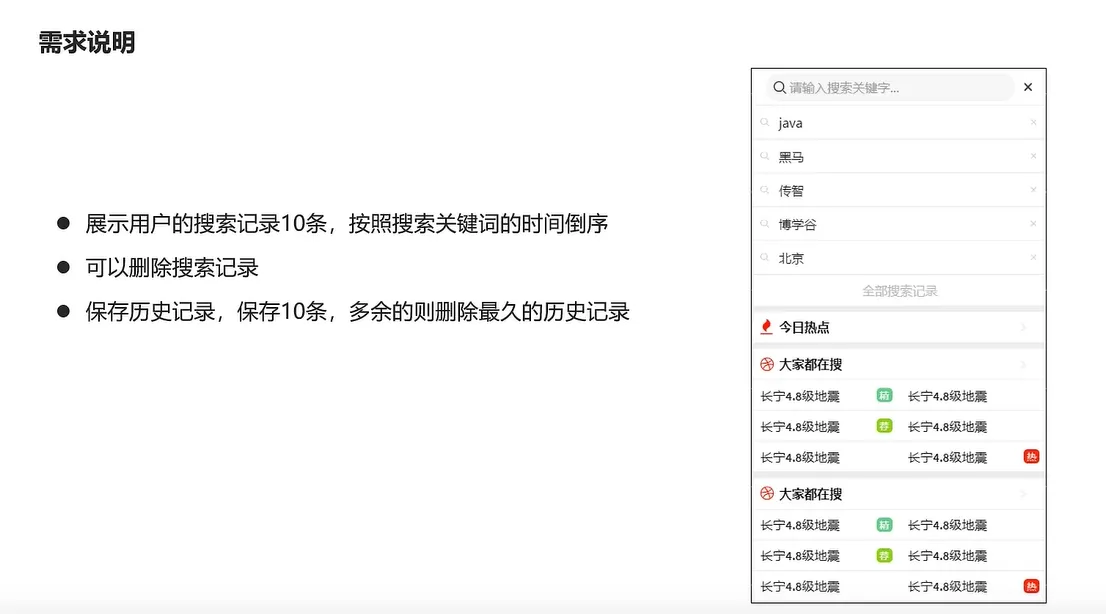
docker启动mongodb
docker run -di --name mongo-service --restart=always -p 27017:27017 -v ~/data/mongodata:/data mongo
java集成mongodb
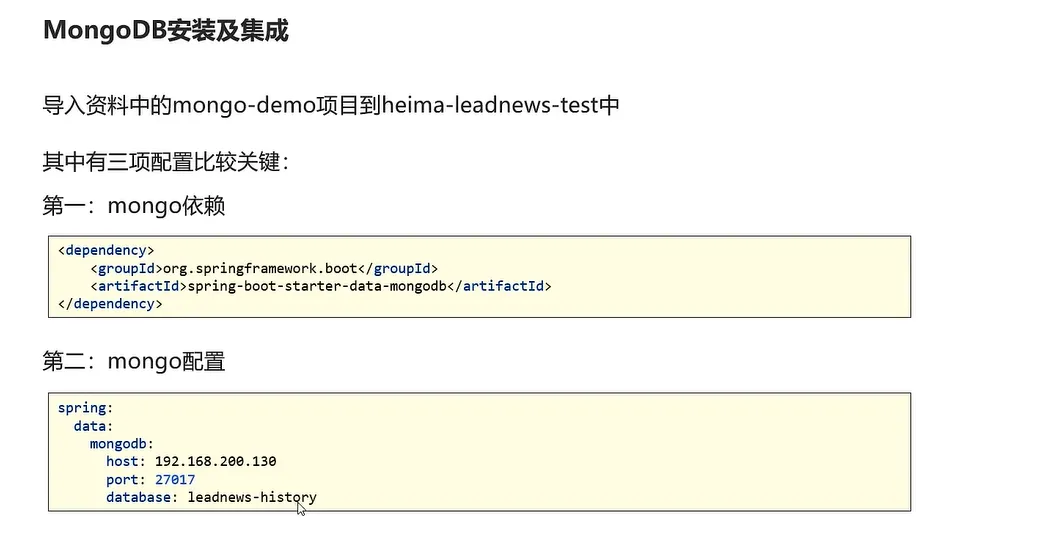
实现用户搜索记录保存功能
javapackage com.heima.search.service.impl;

import com.heima.search.service.ApUserSearchService;
import lombok.extern.slf4j.Slf4j;
import org.springframework.beans.factory.annotation.Autowired;
import org.springframework.data.domain.Sort;
import org.springframework.data.mongodb.core.MongoTemplate;
import org.springframework.data.mongodb.core.query.Criteria;
import org.springframework.data.mongodb.core.query.Query;
import org.springframework.scheduling.annotation.Async;
import org.springframework.stereotype.Service;
import pojos.ApUserSearch;

import java.util.Date;
import java.util.List;


@Service
@Slf4j
public class ApUserSearchServiceImpl implements ApUserSearchService {


    @Autowired
    private MongoTemplate mongoTemplate;


    /**
     * 保存用户搜索历史记录
     *
     * @param keyward
     * @param userId
     */
    @Override
    @Async
    public void insert(String keyward, Integer userId) {
        // 1.查询当前用户的搜索关键词记录
        Query query = Query.query(Criteria.where("userId").is(userId).and("keyword").is(keyward));
        ApUserSearch apUserSearch = mongoTemplate.findOne(query,ApUserSearch.class);
        // 2.存在更新时间
        if (apUserSearch != null){
            apUserSearch.setCreatedTime(new Date());
            mongoTemplate.save(apUserSearch);
            return;
        }
        // 3.不存在,判断当前搜索记录是否超过10
        apUserSearch = new ApUserSearch();
        apUserSearch.setKeyword(keyward);
        apUserSearch.setUserId(userId);
        apUserSearch.setCreatedTime(new Date());


        Query query1 = Query.query(Criteria.where("userId").is(userId));
        query1.with(Sort.by(Sort.Direction.DESC, "createdTime"));
        List<ApUserSearch> apUserSearchList = mongoTemplate.find(query1,ApUserSearch.class);

        if (apUserSearchList == null|| apUserSearchList.size() < 10) {
            mongoTemplate.save(apUserSearch);
        }else{
            ApUserSearch lastApUserSearch = apUserSearchList.get(apUserSearchList.size() - 1);
            mongoTemplate.findAndReplace(Query.query(Criteria.where("id").is(lastApUserSearch.getId())),apUserSearch);
        }
    }
}
在调用es搜索时异步调用
java        if (apUser !=null && dto.getFromIndex() == 0){
            // 异步调用保存搜索记录
            apUserSearchService.insert(dto.getSearchWords(), apUser.getId());
        }
2.实现搜索记录查询
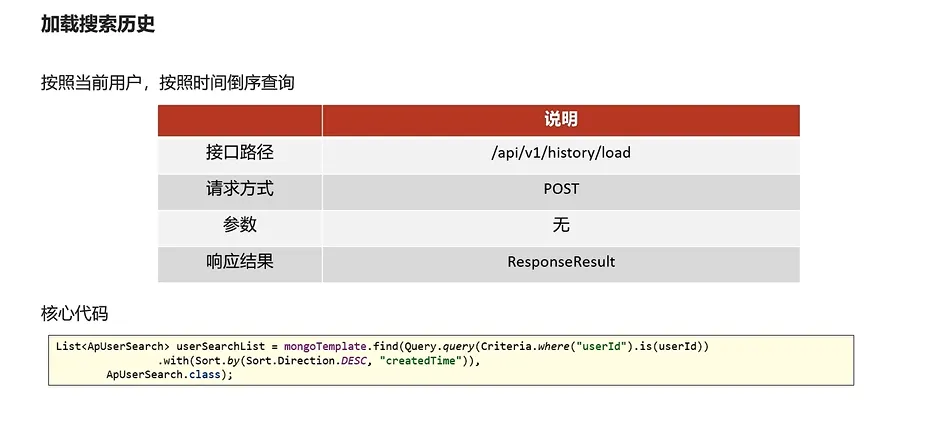
编写查询历史记录的实现类
java /**
     * 查询用户搜索记录
     *
     * @return
     */
    @Override
    public ResponseResult findUserSearch() {
        // 获取当前用户
        ApUser user = AppThreadLocalUtil.getApUser();
        if (user==null){
            return ResponseResult.errorResult(AppHttpCodeEnum.NEED_LOGIN);
        }
        // 根据用户查询记录 降序排序
        List<ApUserSearch> apUserSearchList = mongoTemplate.find(Query.query(Criteria.where("userId").is(user.getId())).with(Sort.by(Sort.Direction.DESC, "createdTime")), ApUserSearch.class);
        return ResponseResult.okResult(apUserSearchList);
    }
编写接口层
java    @PostMapping("/load")
    public ResponseResult findUserSearch(){
        return apUserSearchService.findUserSearch();
    }
3.实现搜索记录删除功能
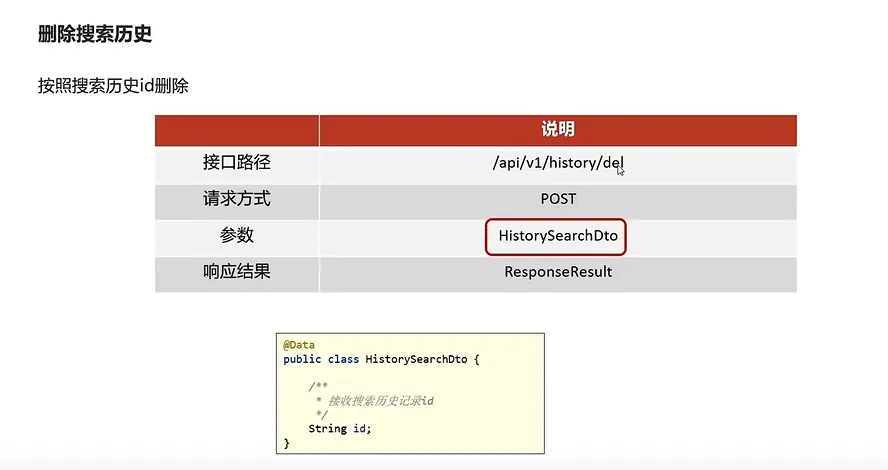
代码实现
java    /**
     * 删除用户搜索记录
     *
     * @param dto
     */
    @Override
    public ResponseResult delUserSearch(HistorySearchDto dto) {
        // 1.检查参数
        if (dto == null || dto.getId() == null) {
            return ResponseResult.errorResult(AppHttpCodeEnum.PARAM_INVALID);
        }
        // 2.判断是否登录
        ApUser user = AppThreadLocalUtil.getApUser();
        if (user == null) {
            return ResponseResult.errorResult(AppHttpCodeEnum.NEED_LOGIN);
        }
        // 3.删除搜索记录
        mongoTemplate.remove(Query.query(Criteria.where("userId").is(user.getId()).and("id").is(dto.getId())), ApUserSearch.class);

        return ResponseResult.okResult(AppHttpCodeEnum.SUCCESS);
    }
4.关键词联想
代码实现
java    /**
     * 实现关键词联想功能
     *
     * @param dto
     * @return
     */
    @Override
    public ResponseResult search(UserSearchDto dto) {
        // 1.检查参数
        if (dto == null || StringUtils.isBlank(dto.getSearchWords())) {
            return ResponseResult.errorResult(AppHttpCodeEnum.PARAM_INVALID);
        }
        // 2.分页检查
        if (dto.getPageSize()>20){
            dto.setPageSize(20);
        }
        // 3.执行查询,模糊查询
        Query query = Query.query(Criteria.where("associateWords").regex(".*?\\" + dto.getSearchWords() + ".*"));
        query.limit(dto.getPageSize());
        List<ApAssociateWords> apAssociateWords = mongoTemplate.find(query, ApAssociateWords.class);
        return ResponseResult.okResult(apAssociateWords);
    }
5.xxl入门
定时任务
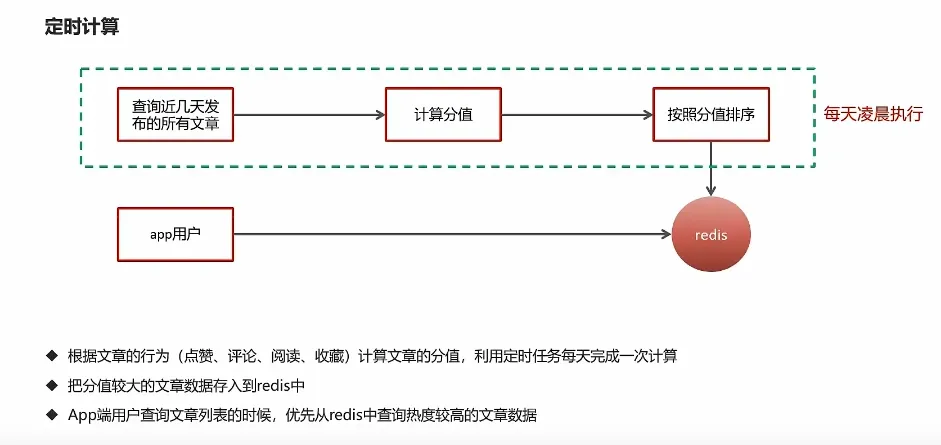
定时任务框架
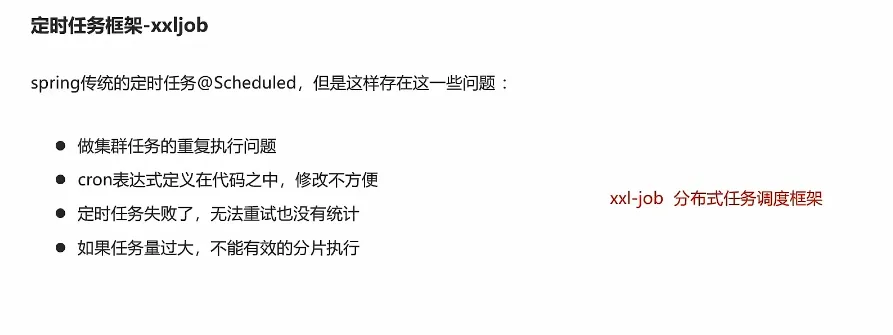
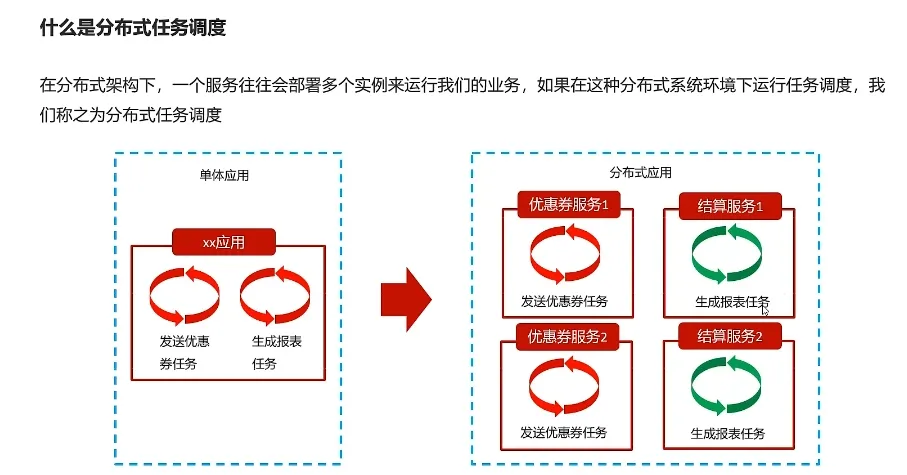
分布式任务调度
创建mysql容器
shelldocker run -p 3306:3306 --name mysql57 \
-v /opt/mysql/conf:/etc/mysql \
-v /opt/mysql/logs:/var/log/mysql \
-v /opt/mysql/data:/var/lib/mysql \
-e MYSQL_ROOT_PASSWORD=root \
-d mysql:5.7。25
创建xxl-job-admin
shelldocker run -e PARAMS="--spring.datasource.url=jdbc:mysql://192.168.42.10:3306/xxl_job?Unicode=true&characterEncoding=UTF-8 --spring.datasource.username=root --spring.datasource.password=root" \
-p 8888:8080 \
-v /tmp:/data/applogs \
--name xxl-job-admin \
--restart=always \
-d xuxueli/xxl-job-admin:2.3.0
快速入门
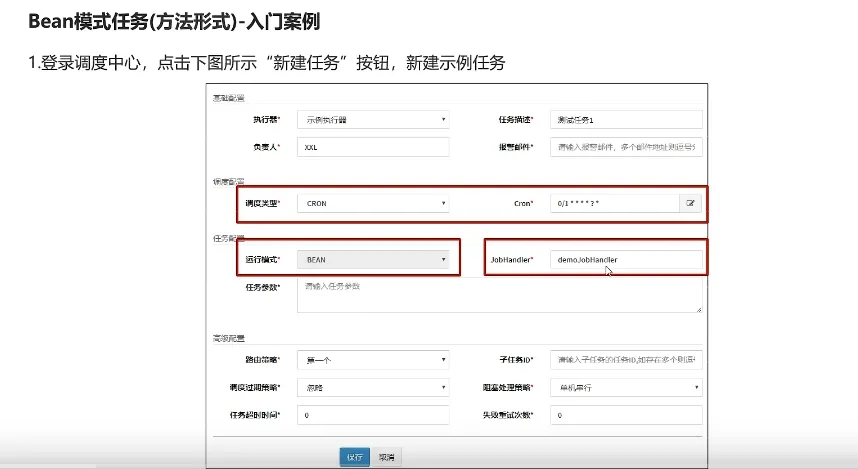
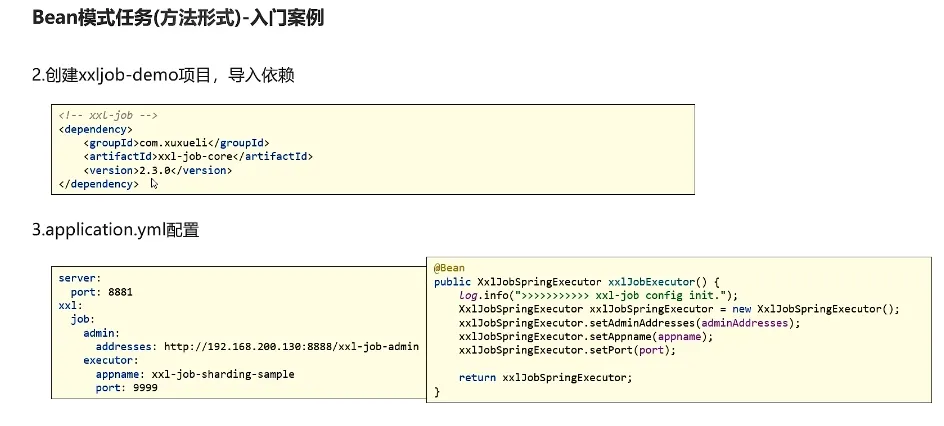
config
javapackage com.heima.config;

import com.xxl.job.core.executor.impl.XxlJobSpringExecutor;
import org.slf4j.Logger;
import org.slf4j.LoggerFactory;
import org.springframework.beans.factory.annotation.Value;
import org.springframework.context.annotation.Bean;
import org.springframework.context.annotation.Configuration;

/**
 * xxl-job config
 *
 * @author xuxueli 2017-04-28
 */
@Configuration
public class XxlJobConfig {
    private Logger logger = LoggerFactory.getLogger(XxlJobConfig.class);

    @Value("${xxl.job.admin.addresses}")
    private String adminAddresses;

//    @Value("${xxl.job.accessToken}")
//    private String accessToken;

    @Value("${xxl.job.executor.appname}")
    private String appname;
//
//    @Value("${xxl.job.executor.address}")
//    private String address;
//
//    @Value("${xxl.job.executor.ip}")
//    private String ip;

    @Value("${xxl.job.executor.port}")
    private int port;
//
//    @Value("${xxl.job.executor.logpath}")
//    private String logPath;
//
//    @Value("${xxl.job.executor.logretentiondays}")
//    private int logRetentionDays;


    @Bean
    public XxlJobSpringExecutor xxlJobExecutor() {
        logger.info(">>>>>>>>>>> xxl-job config init.");
        XxlJobSpringExecutor xxlJobSpringExecutor = new XxlJobSpringExecutor();
        xxlJobSpringExecutor.setAdminAddresses(adminAddresses);
        xxlJobSpringExecutor.setAppname(appname);
//        xxlJobSpringExecutor.setAddress(address);
//        xxlJobSpringExecutor.setIp(ip);
        xxlJobSpringExecutor.setPort(port);
//        xxlJobSpringExecutor.setAccessToken(accessToken);
//        xxlJobSpringExecutor.setLogPath(logPath);
//        xxlJobSpringExecutor.setLogRetentionDays(logRetentionDays);

        return xxlJobSpringExecutor;
    }

    /**
     * 针对多网卡、容器内部署等情况,可借助 "spring-cloud-commons" 提供的 "InetUtils" 组件灵活定制注册IP;
     *
     *      1、引入依赖:
     *          <dependency>
     *             <groupId>org.springframework.cloud</groupId>
     *             <artifactId>spring-cloud-commons</artifactId>
     *             <version>${version}</version>
     *         </dependency>
     *
     *      2、配置文件,或者容器启动变量
     *          spring.cloud.inetutils.preferred-networks: 'xxx.xxx.xxx.'
     *
     *      3、获取IP
     *          String ip_ = inetUtils.findFirstNonLoopbackHostInfo().getIpAddress();
     */


}
job
javapackage com.heima.job;


import com.xxl.job.core.handler.annotation.XxlJob;
import org.springframework.stereotype.Component;

@Component
public class HelloJob {

    @XxlJob("demoJobHandler")
    public void helloJob(){
        System.out.println("简单任务执行了");
    }
}
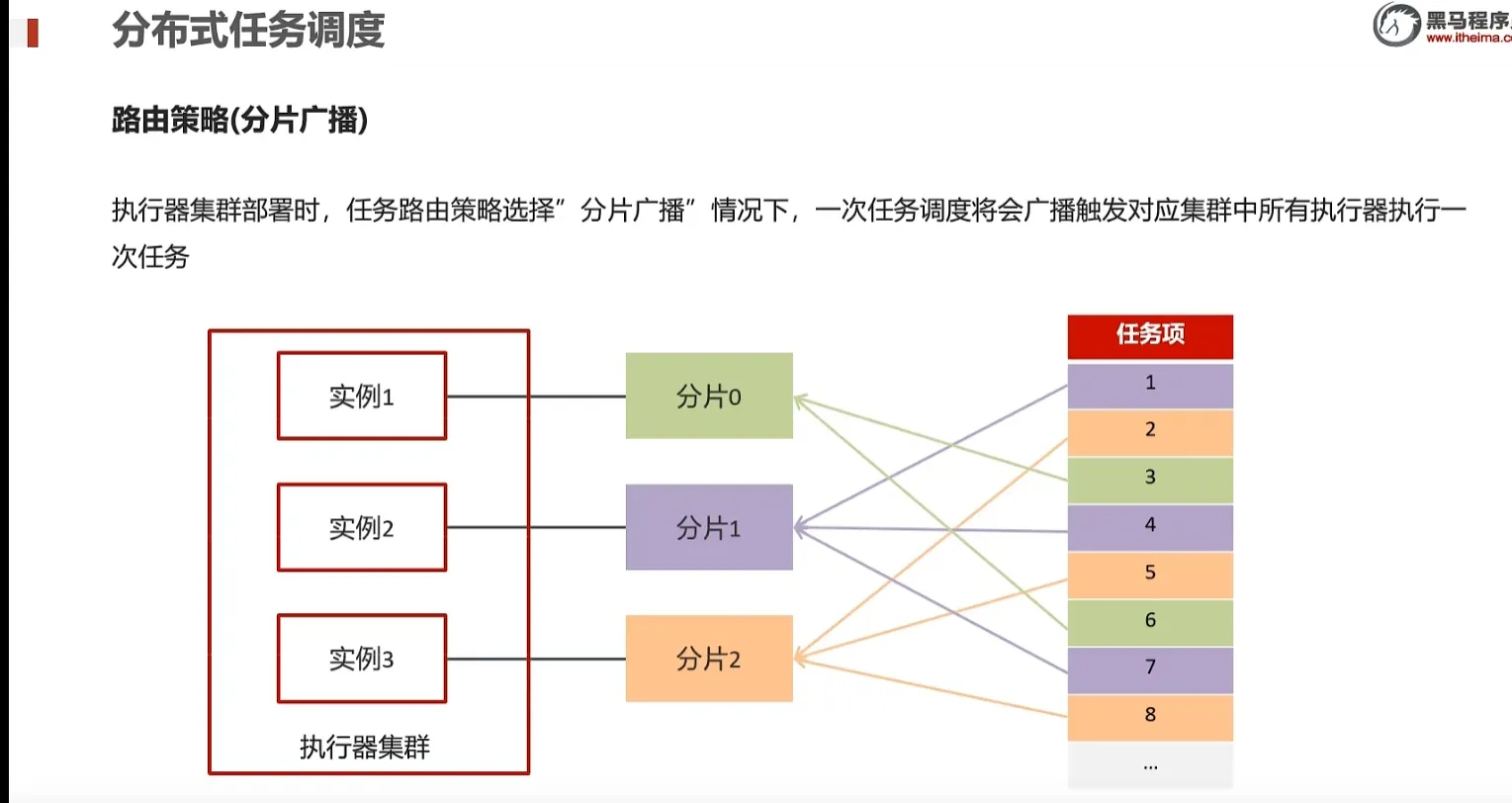
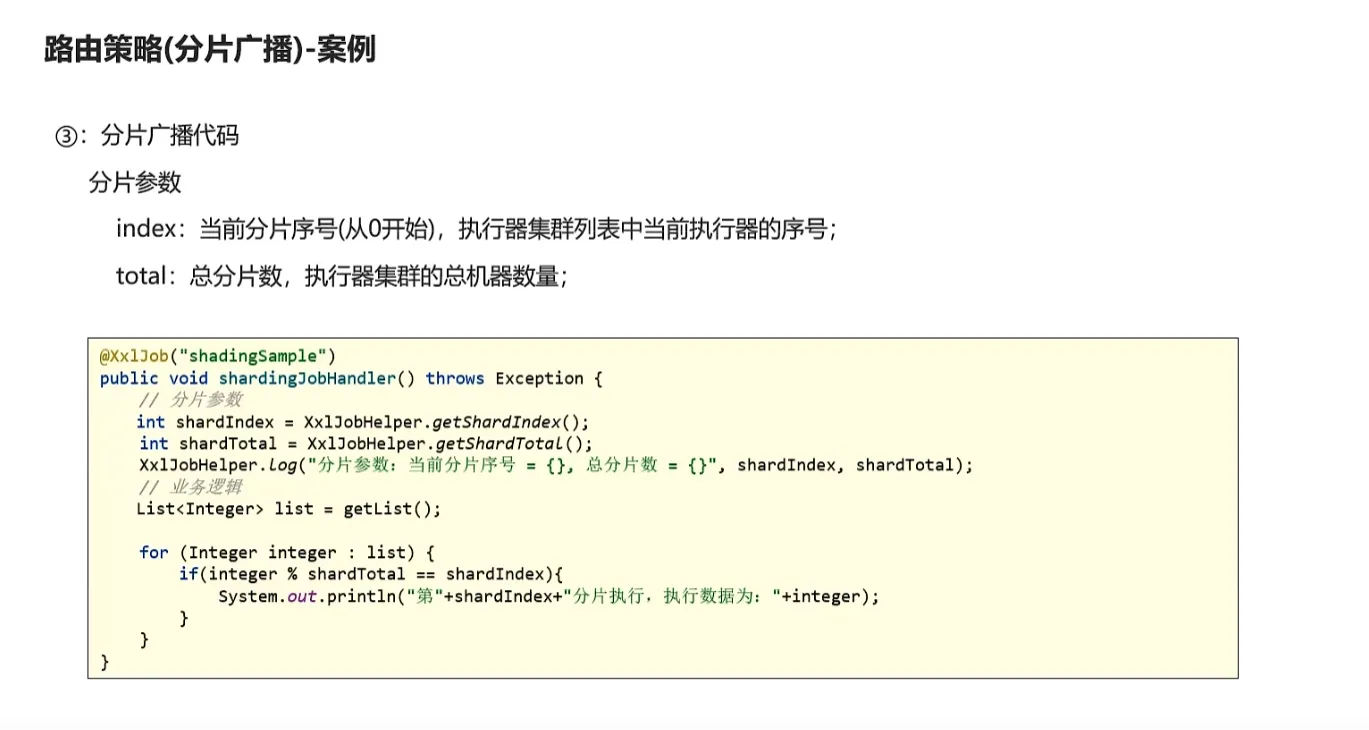
6.xxl-job分片广播
7.热点文章计算
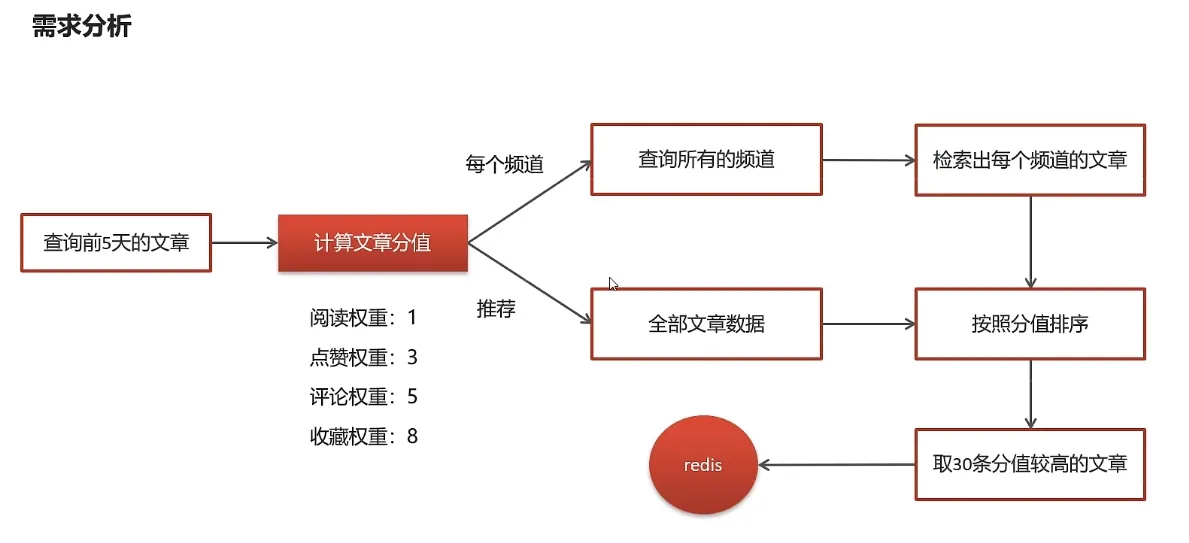
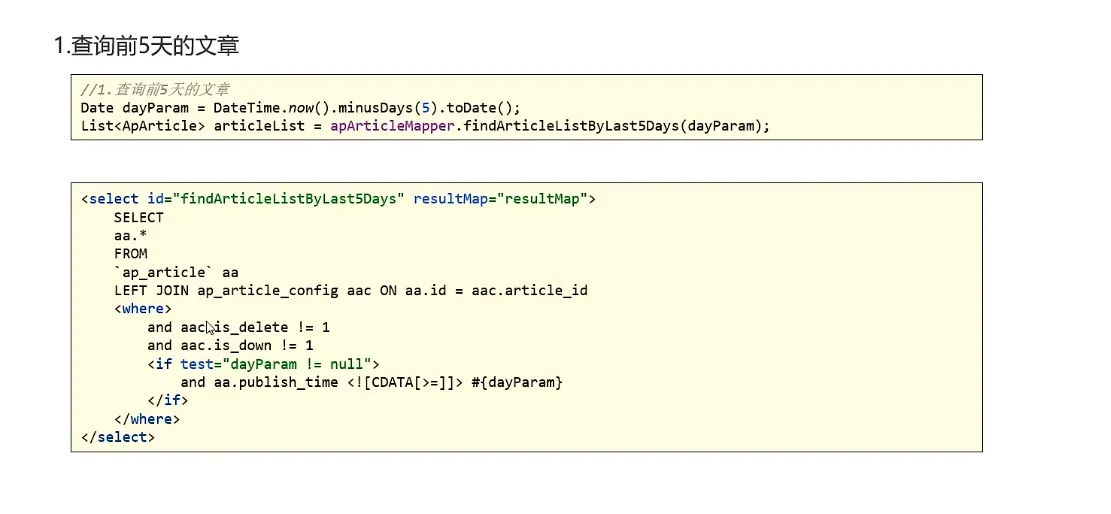
查询前5天的文章
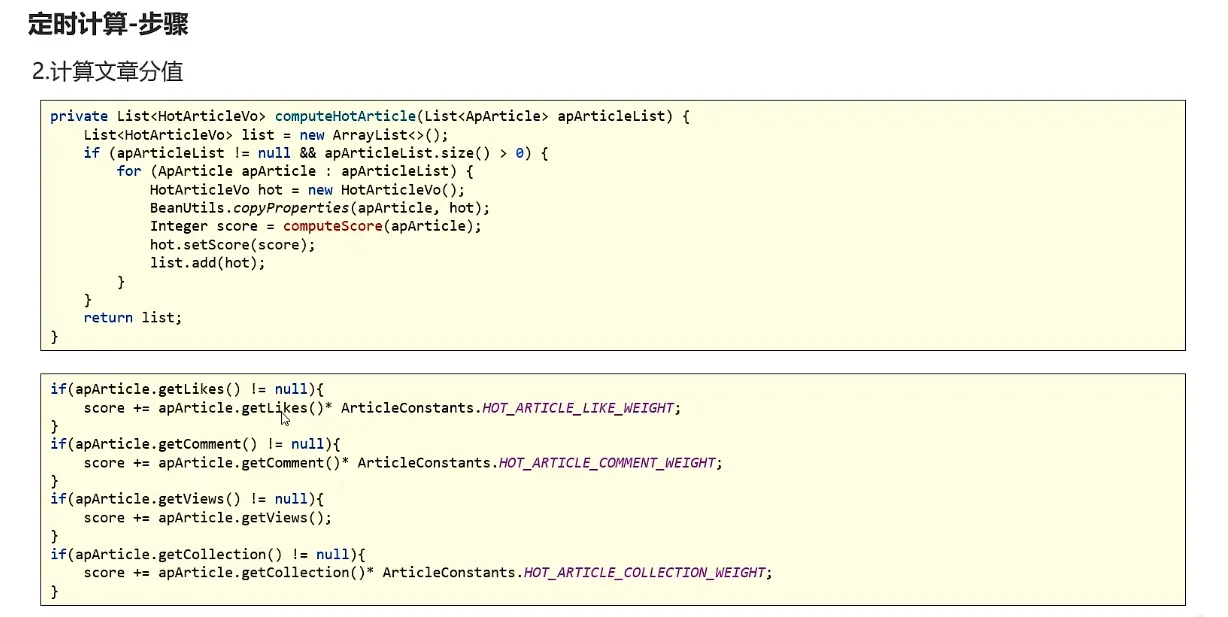
计算分值
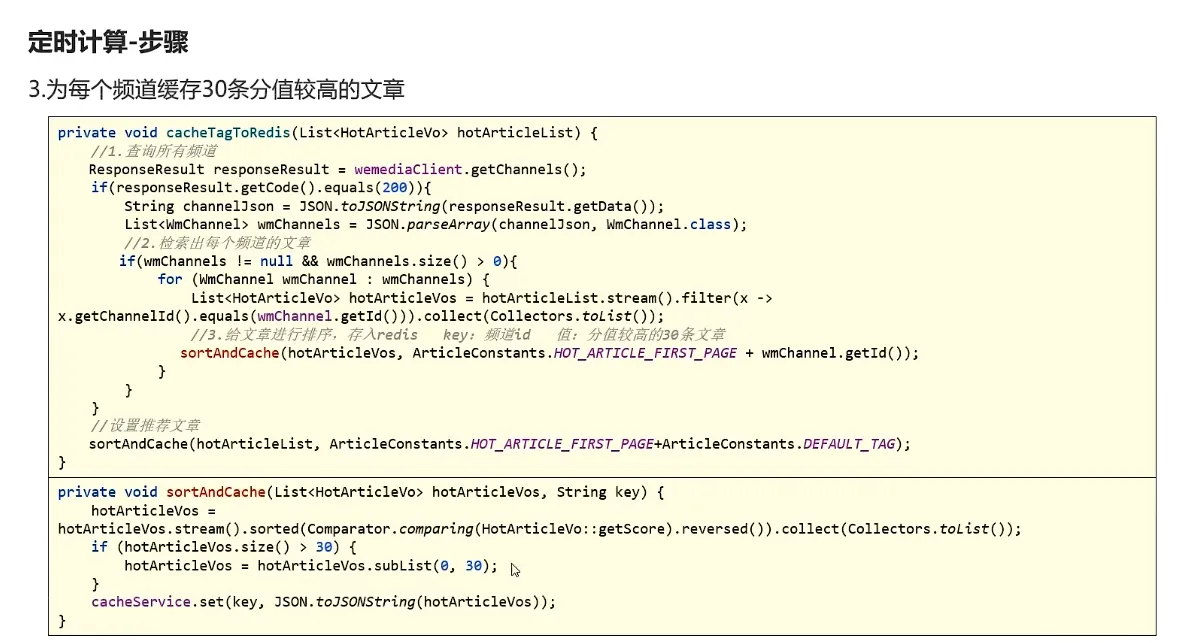
为每一个频道缓存30条文章
代码实现
javapackage com.heima.article.service.impl;

import com.alibaba.fastjson.JSON;
import com.alibaba.fastjson.JSONObject;
import com.heima.apis.wemedia.IWemediaClient;
import com.heima.article.mapper.ApArticleMapper;
import com.heima.article.service.HotArticleService;
import com.heima.common.redis.CacheService;
import com.heima.model.article.pojos.ApArticle;
import com.heima.model.article.vos.HotArticleVo;
import com.heima.model.common.dtos.ResponseResult;
import com.heima.model.wemedia.pojos.WmChannel;
import lombok.extern.slf4j.Slf4j;
import org.joda.time.DateTime;
import org.springframework.beans.BeanUtils;
import org.springframework.beans.factory.annotation.Autowired;
import org.springframework.stereotype.Service;
import org.springframework.transaction.annotation.Transactional;

import java.util.ArrayList;
import java.util.Comparator;
import java.util.Date;
import java.util.List;
import java.util.stream.Collectors;


@Service
@Slf4j
@Transactional
public class HotArticleServiceImpl implements HotArticleService {


    @Autowired
    private IWemediaClient iWemediaClient;


    @Autowired
    private ApArticleMapper apArticleMapper;


    @Autowired
    private CacheService cacheService;

    /**
     * 计算热点文章
     */
    @Override
    public void computeHotArticle() {
        // 查询前5天的文章数据
        Date dateParam = DateTime.now().minusDays(5).toDate();
        List<ApArticle> articleListByLast5Days = apArticleMapper.findArticleListByLast5Days(dateParam);
        // 计算文章的分值
        List<HotArticleVo> hotArticleVoList = computeHotArticleScore(articleListByLast5Days);
        // 为每个频道缓存30条分值高的文章
        cacheTagToRedis(hotArticleVoList);
    }


    /**
     * 为每个频道缓存30条文章
     * @param hotArticleVoList
     */
    private void cacheTagToRedis(List<HotArticleVo> hotArticleVoList) {
       // 每个频道缓存前30条数据
        ResponseResult channels = iWemediaClient.getChannels();
        if (channels.getCode().equals(200)){
            String channelStr = JSON.toJSONString(channels.getData());
            List<WmChannel> wmChannels = JSON.parseArray(channelStr, WmChannel.class);
            // 检索出每个频道的文章
            if (wmChannels != null && wmChannels.size() > 0){
                for (WmChannel wmChannel : wmChannels) {
                    List<HotArticleVo> hotArticleVos = hotArticleVoList.stream().filter(x -> x.getChannelId().equals(wmChannel.getId())).collect(Collectors.toList());
                    // 给文章排序,取30条文章分值较高的文章存入redis
                    sortAndCache(hotArticleVos, "hot_article_first_page" + wmChannel.getId());
                }
            }
        }

        // 设置推荐数据
        sortAndCache(hotArticleVoList, "__all__");
    }

    /**
     * 排序并且缓存数据
     * @param hotArticleVos
     * @param wmChannel
     */
    private void sortAndCache(List<HotArticleVo> hotArticleVos, String wmChannel) {
        hotArticleVos = hotArticleVos.stream().sorted(Comparator.comparing(HotArticleVo::getScore).reversed()).collect(Collectors.toList());
        if (hotArticleVos.size() > 30) {
            hotArticleVos = hotArticleVos.subList(0, 30);
        }
        cacheService.set(wmChannel, JSON.toJSONString(hotArticleVos));
    }


    /**
     * 计算文章分值返回热点文章列表
     * @param articleListByLast5Days
     * @return
     */
    private List<HotArticleVo> computeHotArticleScore(List<ApArticle> articleListByLast5Days) {
        List<HotArticleVo> hotArticleVoList = new ArrayList<>();

        for (ApArticle apArticle : articleListByLast5Days) {
            HotArticleVo hotArticleVo = new HotArticleVo();
            BeanUtils.copyProperties(apArticle,hotArticleVo);
            Integer score = computeScore(apArticle);
            hotArticleVo.setScore(score);
            hotArticleVoList.add(hotArticleVo);
        }
        return hotArticleVoList;
    }


    /**
     * 计算具体文章分值
     * @param apArticle
     * @return
     */
    private Integer computeScore(ApArticle apArticle) {
        Integer score = 0;
        if (apArticle.getLikes() != null){
            score += apArticle.getLikes()*3;
        }
        if (apArticle.getViews() != null){
            score += apArticle.getViews();
        }
        if (apArticle.getComment() != null){
            score += apArticle.getComment()*5;
        }
        if (apArticle.getCollection() != null){
            score += apArticle.getCollection()*8;
        }
        return score;
    }
}
8.流式计算
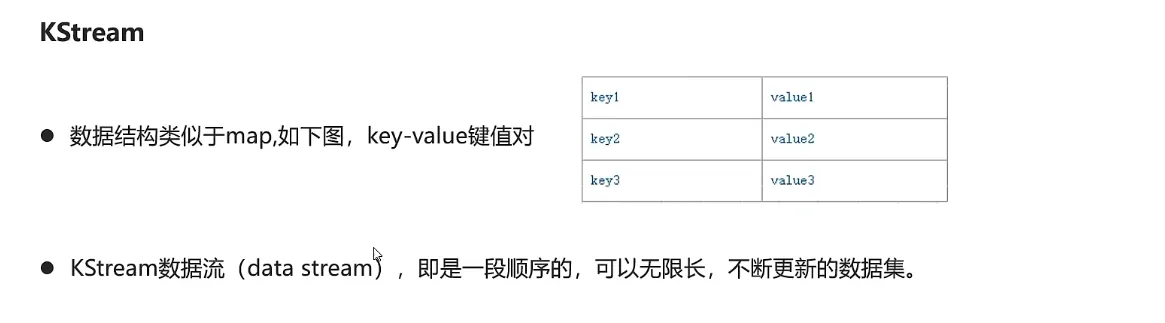
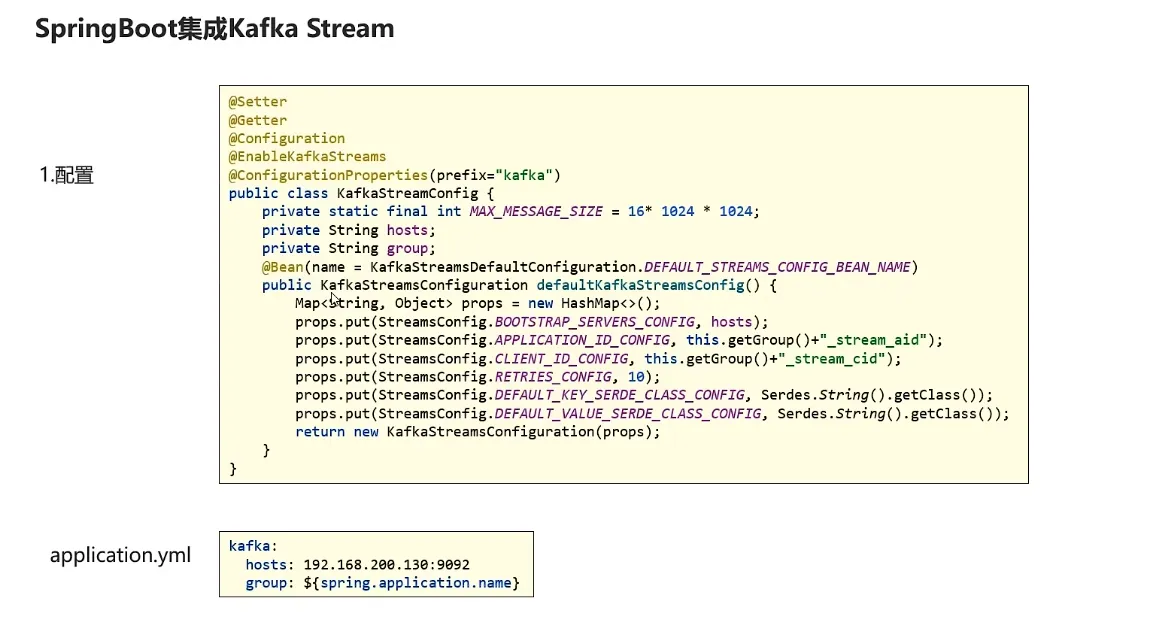
kafkaStream
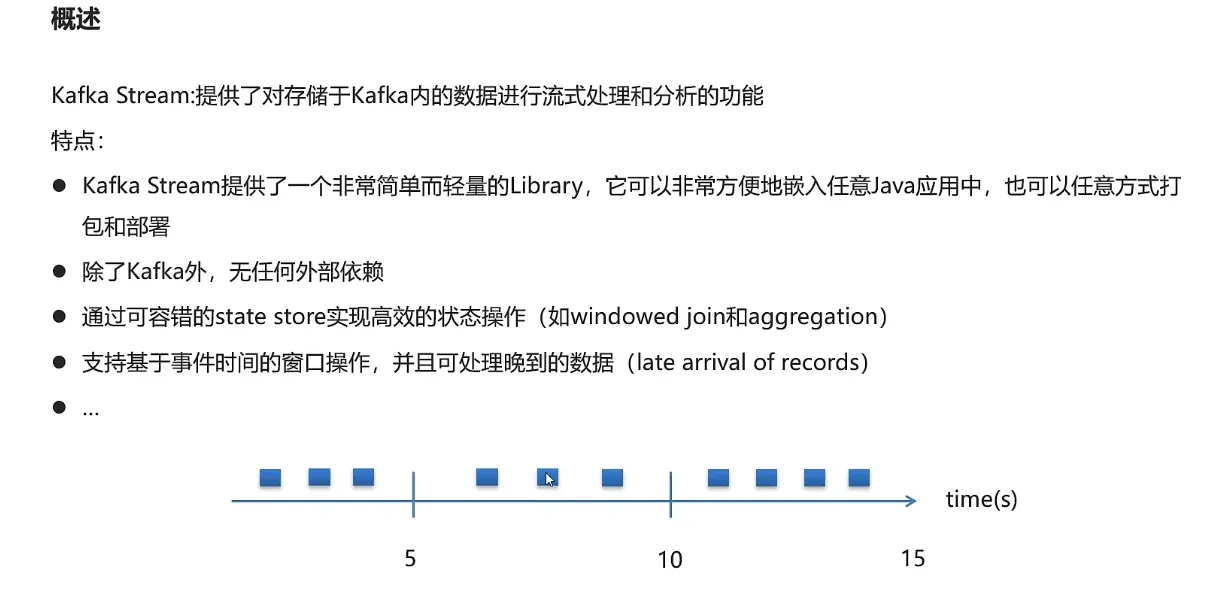
KStream
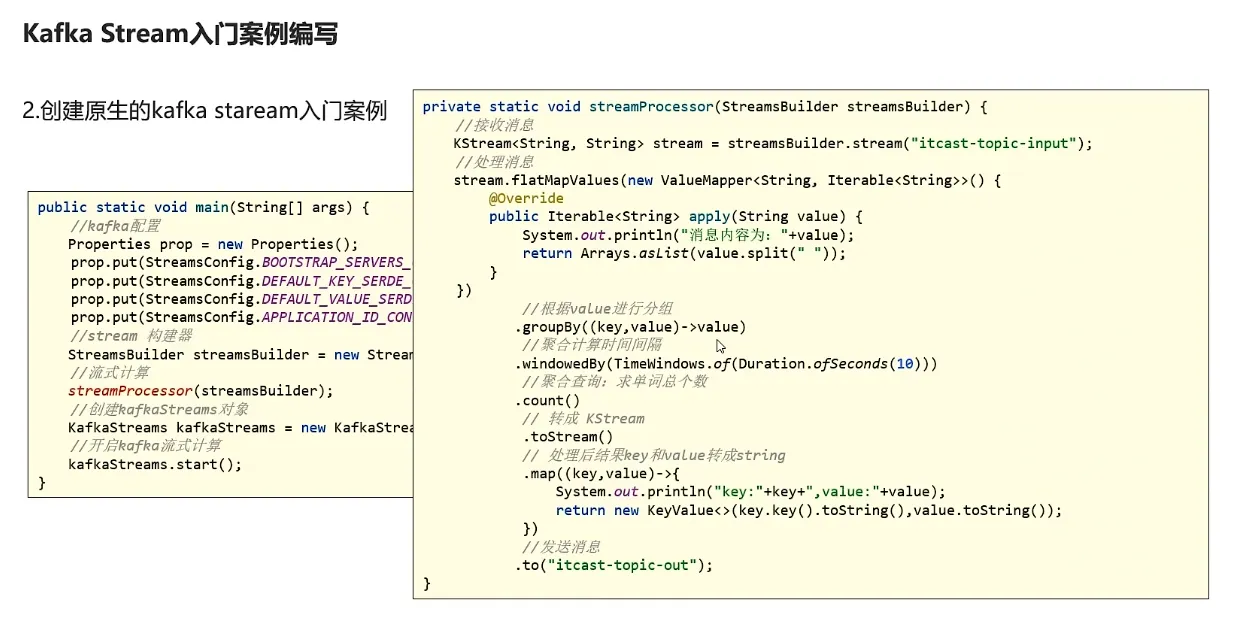
入门案例
本文作者:钱小杰
本文链接:
版权声明:本博客所有文章除特别声明外,均采用 BY-NC-SA 许可协议。转载请注明出处!
目录